AP Automation for Xero: A Practical Guide for Hospitality and Tourism
Xero is very good at recording bills and paying them. What it doesn’t do on its own is everything that has to happen before a bill is ready to pay. Someone has to collect it, key it in, code it, check it against what was ordered, and get it approved by the right person.
In most small and mid-sized businesses, that work is still manual. Bills arrive in five different inboxes, get printed, sit on someone’s desk, and are entered into Xero the week before the payment run. That’s where errors, late fees, and duplicate payments come from.
How Finance Teams Can Reduce Approval Bottlenecks
Most approval delays aren’t caused by bad people or bad intentions. They’re caused by the process. A bill sits for nine days, not because the approver disagreed with it, but because they didn’t know it was waiting, didn’t have enough information to decide, or were on leave.
The result is the same either way: late payments, unhappy suppliers, missed early-payment discounts, and a month-end close that drags.
Here’s how to fix it.
Manual Journal Entry Approval for Xero
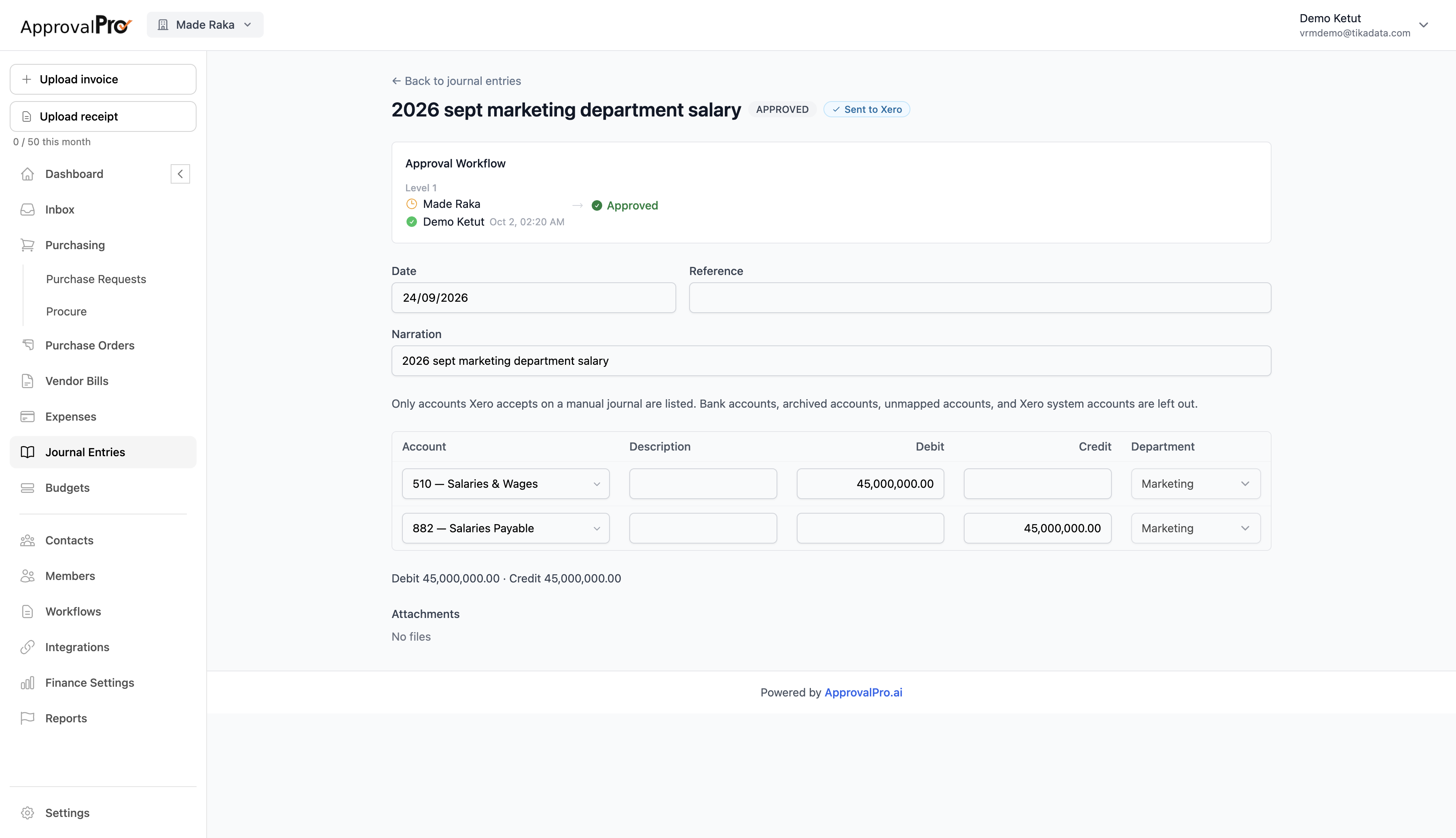
Manual journals like payroll, accruals, and reclassifications can move big numbers in your books. In Xero, anyone with access can post one without a second pair of eyes. ApprovalPro.ai adds that review step with manual journal entry approval for Xero.
Draft it the way Xero expects
Auto-Capture Expenses in Your Xero Approval Workflow
Chasing receipts and keying expense claims into Xero wastes everyone’s time. ApprovalPro.ai captures expenses for you and makes sure they fit the budget before anyone hits approve.
Snap, upload, done
Upload a receipt or forward it by email. ApprovalPro.ai reads it and fills in the details — merchant, date, amount, and tax — so the claim is ready to route for approval in seconds.
Auto-Capture Vendor Invoices in Your Xero Approval Workflow
Typing invoice details into Xero by hand is slow and easy to get wrong. ApprovalPro.ai does it for you.
How it works
Upload a bill, or just forward it by email like you already do. ApprovalPro.ai reads the invoice and pulls out:
- Vendor name
- Invoice number
- Invoice date and due date
- Total amount
It’s ready to route for approval within seconds — no typing required.
Introducing ApprovalPro.ai: Smart Approval Workflows for Xero and QuickBooks
Managing finances in a growing business is hard enough without chasing approvals over email, Slack, or sticky notes. One missed sign-off can mean an unauthorised payment, a compliance headache, or an awkward conversation with a client.
That’s why we built ApprovalPro.ai.
What is ApprovalPro.ai?
ApprovalPro.ai is an approval workflow tool built specifically for teams using Xero or QuickBooks. It sits alongside your existing accounting software and adds a structured, automated approval layer — so nothing gets paid, posted, or processed without the right people signing off first.
Why Finance Teams Need Proper Approval Workflows (And Why Slack and Email Are Killing Your Controls)
Ask any finance manager how they handle spend approvals today, and you’ll hear a familiar story.
A bill lands in Xero. The bookkeeper screenshots it and drops it in a Slack channel. The manager sees it three hours later between meetings, replies “looks fine” with a thumbs up emoji, and the bookkeeper manually marks it approved. Somewhere, a spreadsheet gets updated. Maybe.
It works. Until it doesn’t.
This is how most small and mid-sized businesses run their financial approvals — and it is quietly one of the most expensive habits in modern finance.